
Radiology display selection becomes difficult when one monitor class is expected to serve every imaging workflow. I usually start by separating PACS, CT/MRI, DR/CR, and mammography projects before discussing resolution, size, or model direction.
Radiology monitor model mapping should connect each display class to the actual imaging workflow, user role, validation risk, and deployment plan. PACS, CT/MRI, DR/CR, and mammography projects may require different priorities, so model selection should be confirmed through project-specific review and sample testing.
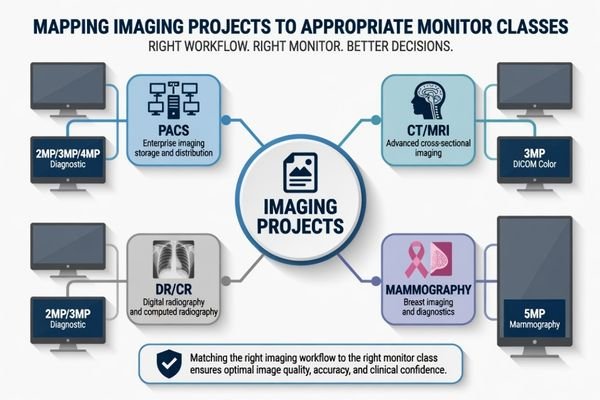
In real radiology projects, the mistake is often not choosing a poor monitor. The mistake is choosing a monitor before the project workflow is clear. A PACS workstation integrator may need model consistency across many desks, while a mammography project may need a more cautious review of grayscale detail and validation behavior. These are different engineering problems.
That is why I map the workflow first, then connect it to the proper radiology monitor class. Resolution, brightness, DICOM behavior, signal input, mounting, and supply continuity are reviewed after the clinical role is defined. This mapping logic leads directly to the first project decision: the imaging workflow.
Why Radiology Monitor Mapping Should Start from the Imaging Workflow
A radiology monitor should not be selected from resolution alone. I first check who uses the display, what images are reviewed, how long the reading session lasts, and where the workstation is deployed.
The imaging workflow defines the display priority. PACS review, CT/MRI diagnosis, DR/CR image reading, and mammography review place different pressure on image detail, consistency, calibration control, and long-term deployment. A suitable model direction should come from workflow mapping before model comparison.

When I review a project, I separate the user role from the monitor specification. A hospital reading room, an imaging equipment console, a distributor replacement project, and a PACS deployment may all ask for a diagnostic display, but their risks are not the same. Workflow review prevents over-selection and under-selection.
PACS Workstations Need Consistency Before Complexity
For PACS workstation projects, the key issue is often not one workstation. It is whether multiple workstations can remain consistent during installation, replacement, and later expansion. I look at signal compatibility, display behavior, mounting layout, and model availability across the expected deployment period. For PACS and imaging workstation integrators, a stable model direction can reduce variation across reading stations and simplify future service planning.
Modality-Based Reading Needs Task-Specific Review
CT/MRI, DR/CR, and mammography projects should be reviewed by the actual image task. CT/MRI reading may need dependable grayscale and color behavior for cross-sectional image review. DR/CR projects may need practical diagnostic performance with controlled deployment cost. Mammography needs a stricter mapping process because subtle grayscale detail and higher-resolution review can create greater validation pressure. I avoid assuming one class fits all cases.
How PACS, CT/MRI, DR/CR and Mammography Projects Create Different Display Priorities
Each imaging project creates its own display priority. I compare the reading task, workstation layout, validation burden, and replacement plan before recommending a monitor class.
PACS projects often prioritize consistency and supply continuity. CT/MRI projects require stable diagnostic review behavior. DR/CR projects may balance dependable 2MP or 3MP performance with deployment cost. Mammography projects need more cautious mapping because fine grayscale detail and high-resolution review are more demanding.
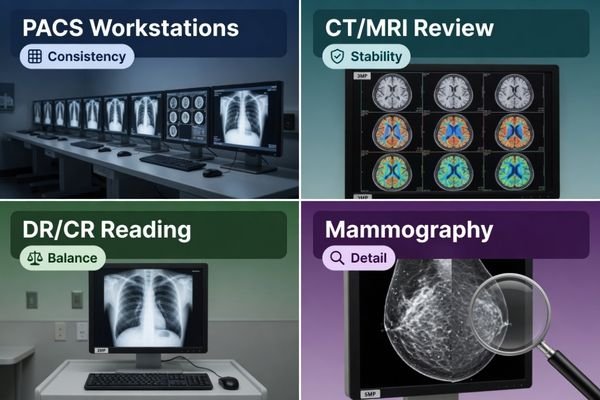
In PACS projects, I usually focus on workstation consistency first. A project may include several reading stations, different graphics outputs, and phased installation. If different monitor models are mixed without control, later maintenance can become difficult. The display class should support the expected workstation environment and should remain available for future replacement, depending on project requirements. This is especially important when the integrator must support hospitals over several years rather than one isolated delivery.
For CT/MRI projects, I pay attention to diagnostic review stability, controlled grayscale behavior, and color image presentation when applicable. DR/CR projects may have a different balance, where 2MP or 3MP diagnostic monitor classes can be practical depending on the review task, budget, and acceptance process. Mammography projects require a more conservative approach. A dedicated 5MP mammography monitor direction may be considered when the project requires high-resolution breast imaging review, but final suitability should be confirmed during sample testing.
Radiology Monitor Model Mapping by Project Scenario
Model mapping becomes clearer when the project scenario is separated from the model code. I use this step to define the display class before discussing detailed product selection.
A project scenario should be mapped to a typical display class, usage pattern, validation focus, and selection direction. This prevents the team from treating PACS, CT/MRI, DR/CR, and mammography as the same monitor problem.
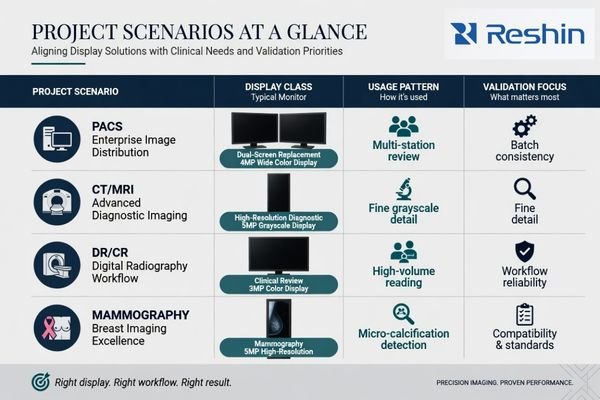
Before I recommend specific models, I create a practical mapping table. This table is not a final specification. It is a project filter. It helps the team understand which monitor class deserves further validation and which class may create unnecessary cost or risk.
| Project Scenario | Typical Display Class | Usage Pattern | Validation Focus | Selection Direction |
|---|---|---|---|---|
| PACS workstation deployment | 2MP, 3MP or 4MP diagnostic display | Multi-station review, phased installation, replacement planning | Workstation compatibility, batch consistency, long-term supply | Choose a stable class that supports standardized deployment |
| CT/MRI diagnostic review | 2MP or 3MP DICOM color monitor1 | Cross-sectional image review and routine diagnostic workflow | Grayscale behavior, color behavior, calibration workflow | Match the monitor class to modality review needs and workstation output |
| DR/CR image reading | 2MP or 3MP diagnostic monitor | General radiographic image review with practical deployment needs | Image presentation, cost control, serviceability | Balance diagnostic performance with project scale and budget |
| PACS dual-screen replacement | 4MP dual-screen PACS display | Two-screen style workflow in a single display format | Layout adaptation, user acceptance, graphics output | Use when workflow consolidation and desk layout are important |
| Mammography project | 5MP mammography display | High-resolution breast imaging review | Fine grayscale detail, brightness stability, calibration control | Apply stricter validation before model approval |
This mapping step helps avoid premature model freeze. It also gives procurement, biomedical, and integration teams a common language. After the display class is agreed, the next step is to confirm whether the selected model behaves correctly in the real workstation environment.
What Should Be Confirmed Before Freezing a Radiology Monitor Model
Model mapping is only the first step. Before a radiology monitor is frozen for batch use, I prefer to confirm both image behavior and integration conditions.
Before model freeze, the project team should validate signal output, workstation compatibility, DICOM behavior, brightness stability, calibration workflow, ambient light conditions, mounting, documentation, batch consistency, and long-term supply. Sample testing should confirm assumptions before procurement expands.
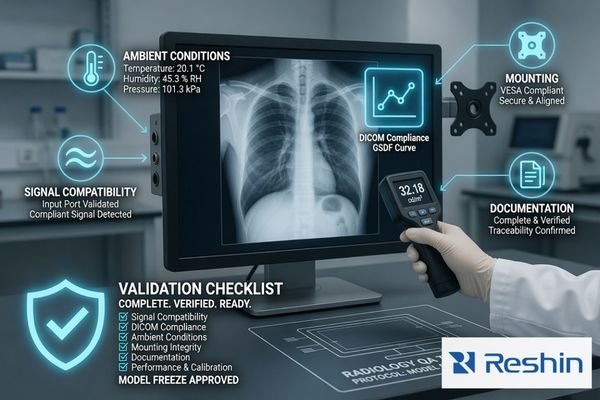
A monitor class may look correct on paper, but project risk appears during integration. I check graphics output, supported inputs, workstation layout, mounting method, calibration process, user acceptance, documentation needs, and future replacement control. If your team needs help confirming these points before model freeze, send the project details to info@reshinmonitors.com.
Compatibility Should Be Tested in the Real Workstation Chain
A radiology monitor should be tested with the actual workstation or representative graphics output. Resolution recognition, input stability, display mode, cable routing, and desk layout should be confirmed before batch approval. I also check whether the calibration workflow can be handled by the project team. A model that performs well in a sample room may still create service pressure if the workstation chain is not reviewed.
Supply and Documentation Should Be Part of Model Freeze
Long-term supply is part of model mapping, not an afterthought.2 If a project will be deployed in phases, the selected model should support future replacement planning and batch consistency as much as possible. I also review documentation needs, packing expectations, accessories, labeling, and service communication. These items do not replace image validation, but they reduce procurement and maintenance uncertainty after deployment.
Recommended Radiology Monitor Models for Different Imaging Projects
After the workflow and display class are clear, product selection can become more controlled. I prefer to connect each model to a practical project role instead of presenting one model as the best choice for every radiology environment. Final approval should still depend on sample testing, workstation compatibility, and the project acceptance process.
The following mapping uses the related Reshin radiology models as project directions. It is not a clinical claim and does not replace validation. The goal is to help PACS integrators, equipment manufacturers, distributors, and hospital teams compare monitor roles in a structured way before they move into detailed evaluation.
| Clinical Role / Application | Usage Pattern | Display Requirements | Recommended Model | Key Integration Considerations |
|---|---|---|---|---|
| Entry-level PACS review or general 2MP radiology workstation deployment | Routine image review, multi-station planning, replacement projects | Practical diagnostic display class with stable workstation behavior | MD22CA | Confirm graphics output, calibration workflow, mounting, and future replacement needs |
| CT/MRI image review workstation | Cross-sectional image review with grayscale and color image presentation | 2MP-class diagnostic display direction depending on project requirements | MD26C | Validate image behavior, workstation compatibility, and user acceptance during sample testing |
| CT/MRI or DR/CR diagnostic reading | Routine diagnostic review where a 3MP class is preferred | 3MP DICOM color monitor direction | MD32C | Confirm display layout, brightness behavior, calibration process, and batch consistency |
| PACS workstation consolidation or dual-screen replacement | PACS reading environment where layout efficiency matters | 4MP dual-screen PACS display direction | MD45C | Review workstation output, viewing layout, desk space, and user adaptation before approval |
| Mammography project review | High-resolution breast imaging review workflow | 5MP mammography display direction | MD52G | Apply stricter sample validation for grayscale detail, brightness stability, and calibration control |
FAQ
Is a higher megapixel radiology monitor always better for every project? No. Higher resolution may help certain imaging tasks, but it can also increase cost, workstation requirements, and validation pressure. The correct direction depends on workflow, user role, and project requirements.
Should PACS workstation projects use the same diagnostic monitor model across all reading stations? In many PACS projects, standardizing the model can simplify deployment, calibration management, replacement, and service communication. However, different reading roles may still require different display classes.
What should be tested before a radiology monitor model is approved for batch deployment? The team should test signal output, workstation compatibility, DICOM behavior, brightness stability, calibration workflow, mounting, ambient conditions, documentation, and batch consistency. Sample testing should represent the real project environment as closely as possible.
Why do mammography projects need a more cautious monitor mapping process? Mammography review can place stricter pressure on subtle grayscale detail and high-resolution image presentation. Because of this, the display class, calibration behavior, and sample validation process should be reviewed more carefully before model freeze.
Conclusion
Radiology monitor model mapping should begin with the imaging workflow, not a single specification. PACS, CT/MRI, DR/CR, and mammography projects create different risks in workstation compatibility, image behavior, deployment scale, and long-term service. I use mapping to narrow the display class first, then confirm the selected model through sample testing, documentation review, and integration checks before batch procurement decisions are finalized.
At Reshin, I support radiology display projects by connecting model direction with engineering review, sample validation, batch consistency, and long-term supply planning. This helps integrators, equipment manufacturers, distributors, and hospital teams reduce avoidable mismatch before deployment. Share your radiology monitor project requirements for engineering review.
✉️ info@reshinmonitors.com
-
"DICOM Compliance and Display Resolution for Accurate …", https://reshinmonitors.com/dicom-compliance-display-resolution/. The American College of Radiology’s practice guidelines recommend 2- to 3-megapixel color diagnostic displays for CT and MRI image interpretation to meet spatial resolution and grayscale performance requirements. Evidence role: expert_consensus; source type: institution. Supports: CT/MRI diagnostic review uses 2MP or 3MP DICOM color monitor. Scope note: Actual institutional requirements may vary based on specific workflow and equipment certifications. ↩
-
"Assessing the Best Supplier Selection Criteria in Supply Chain …", https://pmc.ncbi.nlm.nih.gov/articles/PMC9102987/. Supply‐chain management literature emphasizes that product selection and lifecycle planning must include long‐term sourcing and replacement strategy to ensure consistent availability and batch compatibility. Evidence role: general_support; source type: other. Supports: Long-term supply is part of model mapping, not an afterthought.. Scope note: General procurement context, not specific to medical imaging displays. ↩


