Ergonomics of OR Displays: Mount/Arm/Cart Positioning and Glare Control

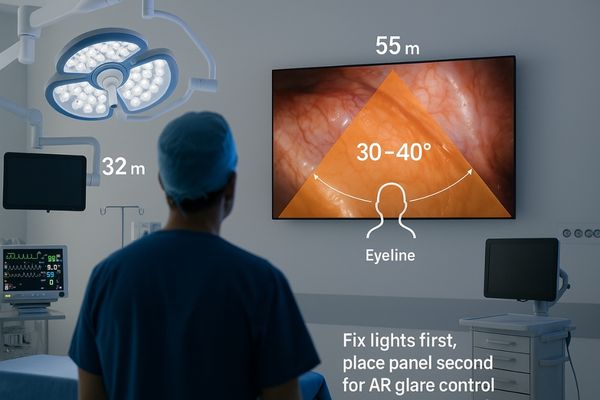
OR scene showing a surgeon facing a 55″ wall-mounted display centered at eyeline within a 30–40° viewing cone; nearby 32″ arm monitor and 27″ cart screen; note “Fix lights first for AR glare control.”

Mount for the eyes, not the wall: center the screen in a 30–40° viewing cone at true working height, then choose 55″ wall for team awareness, ≈32″ arm for reach and mixed views, and ≈27″ cart for tight solo work. Kill glare by fixing lights first, placing the panel second, and letting AR optics finish the job.

Ask For A Quick Quote

We will contact you within 1 working day, please pay attention to the email with the suffix “@reshinmonitors.com”

Ask For A Quick Quote

We will contact you within 1 working day, please pay attention to the email with the suffix “@reshinmonitors.com”