
Replacing a DR/CR workstation monitor should not start with screen size alone. A suitable replacement needs to match the old workstation’s workflow role, native resolution, aspect ratio, video input ports, grayscale requirement, mounting method and installation environment.
Before ordering a replacement DR/CR workstation monitor, buyers should confirm the old monitor model, screen size, resolution, aspect ratio, video inputs, grayscale needs and installation conditions. These details help determine whether a 1MP, high-brightness grayscale, 2MP or 3MP diagnostic display is the right replacement direction.
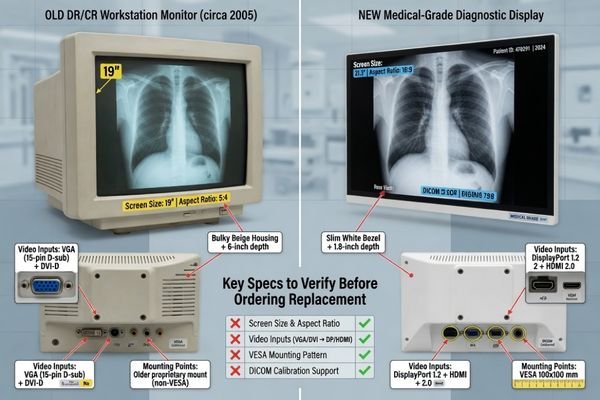
This article is designed for buyers, distributors, service teams and imaging equipment projects that need to replace an existing DR/CR workstation display. The goal is not to choose the highest specification available, but to avoid layout mismatch1, connection problems, grayscale performance issues and installation delays.
A successful replacement usually starts with a few practical questions:
- What was the old monitor used for?
- What resolution and aspect ratio did the workstation output?
- Which video ports are actually available on the system?
- How was the old display mounted?
- Is the new monitor for image acquisition, basic review or more demanding diagnostic work?
Once these details are clear, buyers can choose a replacement display more confidently and avoid unnecessary trial-and-error during installation.
Why DR/CR Monitor Replacement Is Not Only About Screen Size
Replacing a DR/CR workstation monitor is not as simple as finding another display with the same diagonal size. Many legacy imaging workstations were configured around a specific screen ratio, resolution, signal input and software layout.
A DR/CR monitor replacement can fail even when the new display has a similar screen size, because the old workstation may depend on a specific resolution, aspect ratio, input interface, mounting method and software layout.
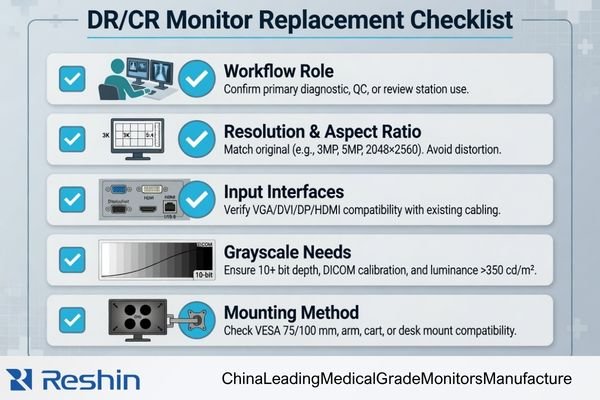
The screen size is only one part of the replacement decision. A 19-inch display, for example, may not behave the same way if the resolution, signal format or software layout is different.
Key factors that affect replacement success
- Resolution: The workstation output should match the monitor’s supported display mode.
- Aspect ratio: A 5:4 interface may not display naturally on a widescreen monitor.
- Input interface: VGA, DVI, DP and HDMI compatibility should be confirmed before ordering.
- Mounting method: The replacement should fit the original stand, arm, cart or VESA structure.
- Workflow role: Acquisition, review and diagnostic tasks may require different display levels.
For example, an older 19-inch 5:4 display may be connected to workstation software designed for 1280×1024 output. Replacing it with a widescreen monitor may stretch the interface, reduce usable viewing space or change the operator’s working layout. This is why the replacement process should begin with the existing workstation environment, not only with the new monitor specification.
Confirm the Actual Workflow Before Choosing a Replacement
Before selecting a replacement monitor, buyers should confirm how the DR/CR workstation is actually used. A display used for image acquisition does not always need the same configuration as a display used for PACS review or diagnostic reading.
The right replacement monitor depends on whether the DR/CR workstation is used for image acquisition, patient image checking, basic PACS review or more detailed diagnostic viewing.
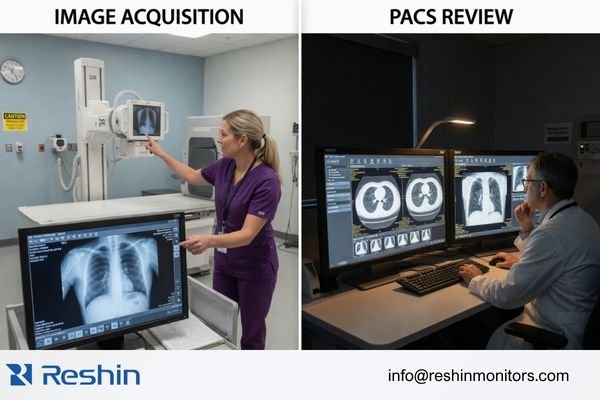
Acquisition and image checking
For basic DR/CR acquisition, patient image confirmation and routine workstation operation, a practical 1MP medical display may be sufficient2. In this type of workflow, the monitor mainly supports image capture, positioning confirmation and daily review tasks.
PACS review or higher-detail viewing
If the workstation is also used for PACS review, CT/MRI console viewing or grayscale-intensive image checking, a higher-resolution or grayscale diagnostic display may be more suitable. In this case, buyers should evaluate whether the replacement should move from 1MP to 2MP or 3MP.
The replacement decision should follow the real workflow instead of simply upgrading to the highest available resolution. This helps buyers avoid both over-specifying a basic acquisition station and under-specifying a workstation used for more sensitive review tasks.
Match Screen Size, Aspect Ratio and Native Resolution
Screen size, aspect ratio and native resolution should be checked together. A replacement display may have the same diagonal size as the old monitor but still behave differently if the resolution or screen ratio does not match the original workstation output.
Replacing a legacy 5:4 DR/CR display with a widescreen monitor may change software window proportions, image layout and user workflow. Screen size, aspect ratio and native resolution should be evaluated as one set of compatibility factors.
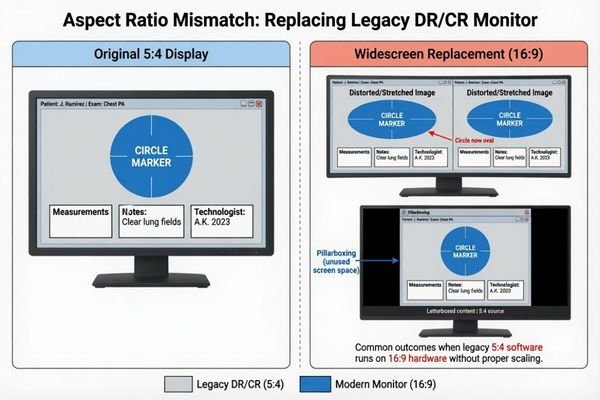
Many legacy DR/CR workstations use 19-inch 5:4 displays with 1280×1024 resolution3. Some systems may use 21.3-inch, 24-inch or other display formats depending on the workstation design.
When checking the old monitor, buyers should confirm:
- The original screen size.
- The native resolution.
- The aspect ratio.
- The workstation output resolution.
- Whether the software interface was designed for a fixed screen format.
If the original software interface was built around a 5:4 layout, a widescreen replacement may create stretched images, black borders or changed software proportions. The safest approach is to confirm the original display size, native resolution and aspect ratio before selecting the replacement model.
Check Video Inputs and Legacy System Compatibility
Video input compatibility is one of the most important checks in a DR/CR monitor replacement project. Older DR/CR systems may still rely on VGA, DVI or legacy workstation outputs, while newer medical monitors often use DP, HDMI or mixed input configurations.
The replacement monitor should match the actual video output of the DR/CR workstation, because many older systems still rely on VGA, DVI or legacy signal configurations.
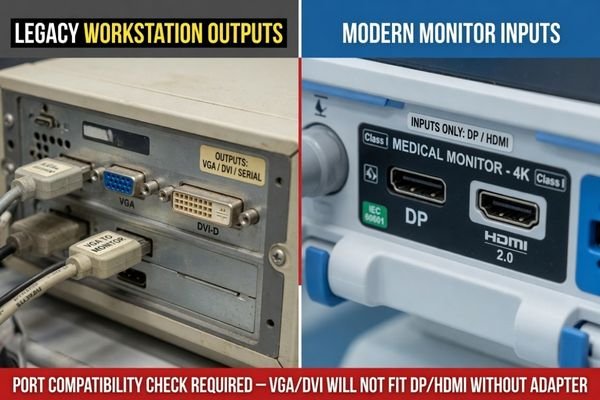
The replacement should be selected according to the workstation’s real video output4, not only the preferred input on the new monitor.
What buyers should check
- Whether the old system outputs VGA, DVI, DP or HDMI.
- Whether the output comes from the workstation, imaging equipment or graphics card.
- Whether the old monitor used a direct connection or an adapter.
- Whether the replacement display supports the same signal format.
- Whether a converter has been tested with the actual system.
Adapters or signal converters may work in some cases, but they can also introduce compatibility issues, image instability or additional installation troubleshooting. Before requesting a quote, buyers should provide clear photos of the workstation output ports and the old monitor input area. This helps confirm whether the replacement should include legacy input support or whether a tested conversion solution is acceptable.
Review Mounting, Space and Installation Conditions
A replacement monitor must also fit the physical workstation environment. Even if the image performance is suitable, the display may still fail as a replacement if it cannot be mounted, powered or positioned correctly.
A technically suitable monitor may still fail as a replacement if it cannot fit the existing cart, arm, desktop stand, VESA mount, cable path or available workstation space.
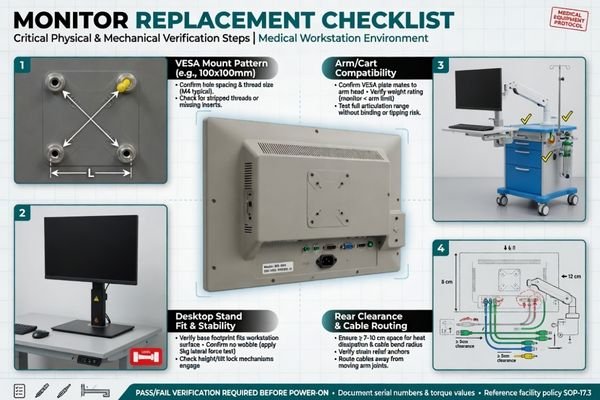
Mechanical compatibility is especially important for compact DR/CR workstations, medical carts and equipment-integrated systems.
Installation details to confirm
- VESA mounting size: Check whether the replacement supports the existing mounting pattern.
- Stand or arm compatibility: Confirm whether the old stand, wall arm or cart can support the new display.
- Rear clearance: Make sure the housing depth and cable direction fit the available space.
- Power connection: Confirm whether the power supply position and cable routing are suitable.
- External dimensions: Do not rely on diagonal screen size alone.
A display with the same screen size may still have a different housing shape, bezel width, depth or mounting position.5 For replacement projects, the external structure of the monitor should be checked together with the display specification.
Evaluate Grayscale Needs and DICOM-Aligned Display Modes
Not every DR/CR replacement project needs a high-end diagnostic reading monitor. However, grayscale presentation still matters when the display is used for medical image viewing, especially in X-ray-related workflows.
Not every DR/CR replacement project needs a high-end diagnostic reading monitor, but grayscale presentation and DICOM-aligned display modes should still be evaluated according to the actual imaging workflow.
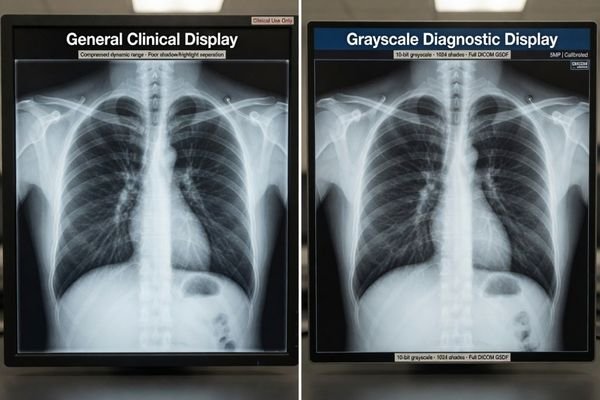
For basic image acquisition and image confirmation, a 1MP medical display with DICOM-aligned display modes may be sufficient. If the existing workstation was originally equipped with a high-brightness grayscale monitor, or if it is used for regular PACS review, a higher-performance grayscale or diagnostic display may be more appropriate.
A practical way to judge the grayscale requirement is to look at the old workflow:
- If the display is used mainly for acquisition and confirmation, a practical 1MP replacement may be enough.
- If the old monitor was a high-brightness grayscale display, buyers should avoid replacing it with a lower-level general display.
- If the workstation supports regular PACS review, 2MP or 3MP options should be considered.
- If the workflow involves CT/MRI review or diagnostic reading, a more specialized diagnostic display may be required.
The key is to avoid a one-size-fits-all decision. A basic acquisition workstation should not automatically be upgraded to an expensive high-end model if the workflow does not require it, but a grayscale-intensive review workstation should not be replaced with a general display that cannot support stable grayscale presentation.
Choose the Right Replacement Level: 1MP, 2MP or 3MP
The appropriate replacement level should be determined by the actual workstation workflow. Higher resolution can be useful, but it is not always necessary for every DR/CR replacement project.
The replacement level should follow the actual workstation workflow: 1MP may be enough for basic DR/CR acquisition, while 2MP or 3MP may be more suitable for PACS review, CT/MRI viewing or higher-detail diagnostic work.
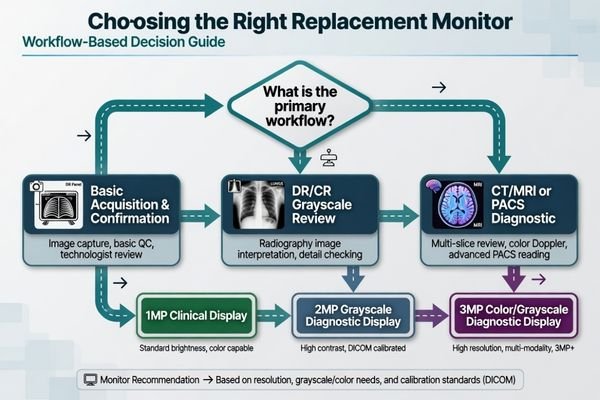
A compact DR/CR acquisition station may continue with a 1MP display. A workstation that requires stronger grayscale visibility may need a high-brightness 1MP grayscale monitor. A DR/CR or PACS grayscale review workflow may require 2MP. If CT/MRI or broader PACS diagnostic review is involved, 3MP color or grayscale diagnostic displays may be a better match.
| Replacement Situation | Suggested Direction | Recommended Reshin Model |
|---|---|---|
| Basic DR/CR acquisition and image checking | 1MP clinical diagnostic display | MD10C |
| 1MP workflow with stronger grayscale visibility | 1MP high-brightness grayscale display | MD18G |
| DR/CR or PACS grayscale workflow requiring more detail | 2MP grayscale diagnostic display | MD26GA |
| CT/MRI or PACS diagnostic review involved | 3MP color or grayscale diagnostic display | MD32C / MD33G |
This table should be used as a replacement path, not as a fixed rule. The final model should be confirmed based on the old display, workstation output, application workflow and installation conditions.
What Buyers Should Send Before Requesting a Replacement Quote
A clear replacement request helps the supplier recommend a suitable model faster and reduces the risk of compatibility mistakes. Instead of only asking for “a DR/CR monitor,” buyers should provide the technical and application details of the existing workstation.
A clear replacement request should include the old monitor model, screen size, resolution, input port photos, workstation application, mounting method, quantity and target market, so the supplier can recommend a compatible replacement more accurately.
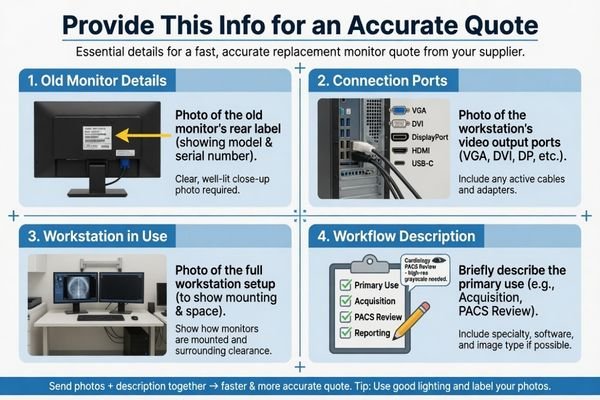
Photos are especially useful. A photo of the old monitor label can help identify the original configuration. Photos of the input ports can confirm signal compatibility. A wider photo of the full workstation setup can show the mounting method, available space and cable routing.
| Information to Send | Why It Matters |
|---|---|
| Old monitor brand and model | Helps identify the original specifications and configuration |
| Screen size and resolution | Confirms visual layout and software compatibility |
| Photos of input ports | Verifies compatibility with VGA, DVI, DP or HDMI outputs |
| Workstation application | Distinguishes acquisition, review and diagnostic needs |
| Mounting method | Confirms VESA, cart, arm or desktop stand compatibility |
| Quantity and target market | Supports quotation, documentation and delivery planning |
A complete request makes it easier to confirm whether the project is suitable for a 1MP replacement, a high-brightness grayscale model, a 2MP grayscale display or a 3MP diagnostic monitor.
Need Help Matching a Replacement Monitor for Your DR/CR Workstation?
For DR/CR workstation replacement, the safest approach is to match the existing system first and then select the right display level based on workflow, interface, installation and grayscale requirements. This reduces the risk of choosing a monitor that looks suitable on paper but does not fit the real workstation environment.
Reshin can review the old monitor information, interface photos, workstation application and installation conditions to help buyers choose a suitable replacement direction. Buyers can start by reviewing the Radiology Monitor product range for diagnostic display options. Project buyers and equipment manufacturers can also evaluate Reshin’s Diagnostic Monitor Manufacturer solution for system-level display support.
To request a recommendation, send the old monitor model, interface photos, application workflow and expected quantity. Reshin can help determine whether a 1MP, high-brightness grayscale, 2MP or 3MP diagnostic display is the most suitable replacement path for your DR/CR workstation.
Suggested CTA: Send Your DR/CR Monitor Replacement Details
Email: info@reshinmonitors.com
FAQ
Can I replace a DR/CR workstation monitor with any medical display?
No. A replacement monitor should match the original workstation’s resolution, aspect ratio, input interface, mounting method and actual workflow. A medical display with the wrong interface or screen layout may not fit the existing DR/CR system.
Is a 1MP monitor enough for DR/CR acquisition workstations?
A 1MP monitor can be suitable for basic DR/CR acquisition, image checking and entry-level clinical review. If the workstation is used for higher-detail PACS review or diagnostic reading, a 2MP or 3MP diagnostic display may be more appropriate.
When should I choose a grayscale diagnostic monitor for DR/CR replacement?
A grayscale diagnostic monitor is more suitable when the original workstation focuses on grayscale image viewing, DR/CR radiography, PACS review or higher luminance requirements. It is also useful when the buyer wants more consistent grayscale presentation than a general clinical review display.
What information should I send before requesting a DR/CR monitor replacement quote?
Buyers should send the old monitor model, screen size, resolution, input interface photos, workstation application, mounting method, quantity and target market. Photos of the monitor label and system connection area are especially useful for compatibility checking.
Should I upgrade from 1MP to 2MP or 3MP during replacement?
An upgrade is useful when the workflow has changed from basic acquisition to PACS review, CT/MRI viewing or more demanding diagnostic work. If the workstation is still used mainly for DR/CR acquisition and image confirmation, a suitable 1MP replacement may be enough.
Which Reshin models are suitable for DR/CR workstation monitor replacement?
MD10C can be considered for compact 1MP DR/CR acquisition and basic review. MD18G is suitable for high-brightness 1MP grayscale workflows. MD26GA fits 2MP grayscale DR/CR and PACS review. MD32C or MD33G can be considered when 3MP diagnostic review is required.
-
"Native Resolution for Medical Displays, DICOM and 4K", https://reshinmonitors.com/native-resolution-medical-displays-3/. This source explains that mismatches between workstation output resolution and display native resolution may cause scaling, cropping, or layout errors. This supports the need to match replacement displays with the original imaging workstation setup. Scope note: Exact behavior depends on workstation software, GPU output, and monitor configuration. ↩
-
"DICOM Compliance and Display Resolution for Accurate Medical …", https://reshinmonitors.com/dicom-compliance-display-resolution/. This source notes that 1MP medical displays can be suitable for basic DR/CR acquisition, image confirmation, and routine review. Scope note: Requirements vary by modality, clinical use, and local regulations. ↩
-
"Managing DICOM images: Tips and tricks for the radiologist – PMC", https://pmc.ncbi.nlm.nih.gov/articles/PMC3354356/. This article discusses DICOM image handling and legacy radiology workstation practices. It supports the point that many older DR/CR systems used 19-inch 5:4 displays with 1280×1024 resolution. Scope note: This reflects legacy systems and may not apply to newer high-resolution workflows. ↩
-
"monitors – SAM.gov", https://sam.gov/opp/04ad598abe1a1047acbe2183c45d573a/view. This procurement source shows that monitor selection often depends on actual computer video output ports and compatibility requirements. Scope note: It is based on general IT procurement and may not cover every specialized imaging system. ↩
-
"VESA mount – Wikipedia", https://en.wikipedia.org/wiki/VESA_mount. This source explains common monitor mounting standards and variations. It supports the point that displays with the same screen size may still differ in housing, bezel, depth, or mounting position. Scope note: Medical and industrial displays may follow additional mechanical requirements. ↩


